How to Load Downloaded AI Model Files Safely: Pickle Risks, safetensors, Hashes and Model Signing
Downloaded model files can run code when loaded. Learn how pickle risk works, what safetensors and signing do and don't prove, and a safe intake checklist.
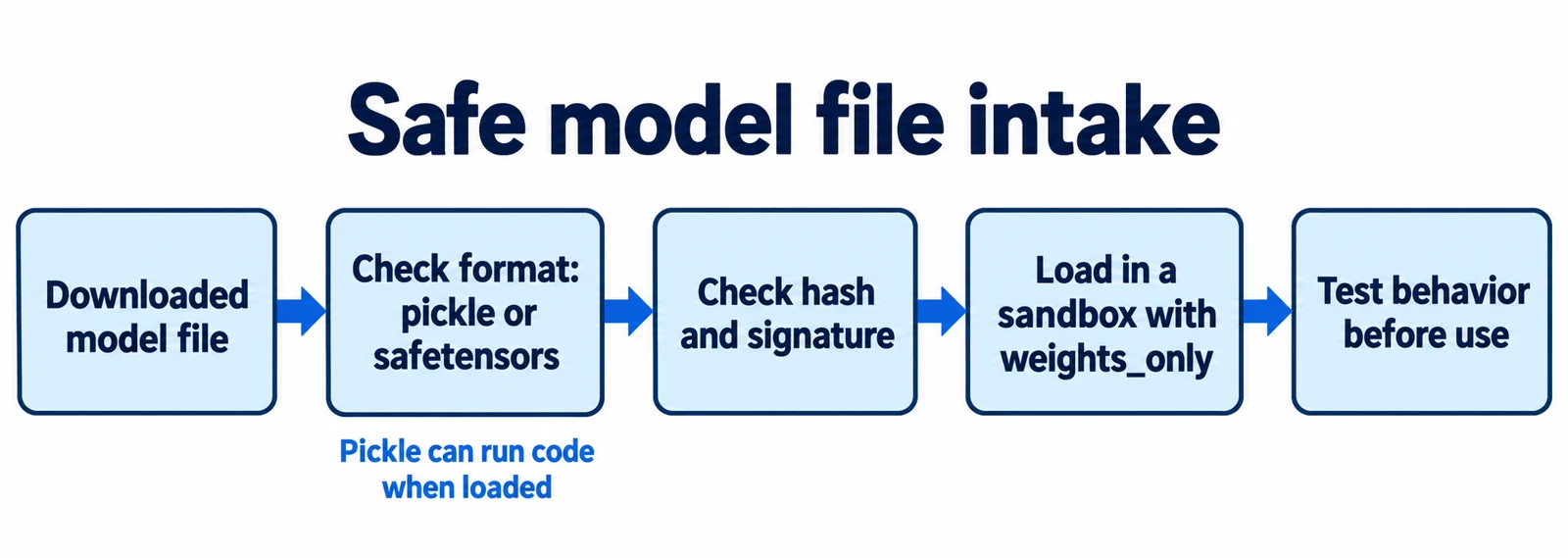
Most people think of an AI model as data: a big pile of numbers. But the file that holds those numbers can sometimes behave like a program. If you load the wrong file in the wrong way, it can run code on your machine before you ever ask the model a question.
This article explains how that happens, what a "model supply chain" is, and which controls reduce the risk. It covers pickle files, the safetensors format, hash checks, and model signing. It ends with a worked example and a checklist you can adapt. It focuses on one slice of AI security: trusting the files you download.
Article index
- What a model supply chain is
- Why pickle files can run code
- A documented case: broken pickles that slipped past a scanner
- Safer formats and safer loading
- Hashes and model signing: what they prove
- A worked example
- Common mistakes
- Recap
- Research Sources
What a model supply chain is
A supply chain is everything your product depends on but did not build. For AI, that includes pre-trained models, adapters, datasets, Python libraries, and the platforms that host them. The OWASP (Open Worldwide Application Security Project) guidance says LLM supply chains can be weakened at the level of training data, models, and deployment platforms.
OWASP also makes two points that matter here. First, pre-trained models are opaque binaries that are hard to inspect. Second, model cards and documentation do not verify where a model came from, so an attacker can impersonate or compromise a supplier account (OWASP LLM03:2025).
Two different questions follow. Is this file safe to load? And is the model inside safe to use? This article mostly addresses the first. The second needs testing, which we return to at the end.
Why pickle files can run code
Pickle is Python's built-in way to save objects to a file. The Hugging Face Hub documentation notes that it is the default format for PyTorch model weights. A pickle file is a list of small instructions that Python follows step by step when you load it.
That is the problem. According to the same page, some instructions import code and call it. The ones that pose a threat are GLOBAL, STACK_GLOBAL and REDUCE: the first two import something, and REDUCE runs it with the supplied arguments. A file can therefore import a built-in such as exec and run any text it contains.
The Hugging Face page demonstrates this with a harmless message that prints when the file loads. Its advice, repeated across Python documentation, is not to unpickle data from untrusted sources. The page also notes that Python's pickletools module can read the instructions without running them, which is the basis for safe inspection.
A documented case: broken pickles that slipped past a scanner
Hugging Face scans files uploaded to its Hub. The documentation page I opened describes a ClamAV antivirus scan and a pickle import scan, and it warns the scanner is "not 100% foolproof". That page is undated, so treat the scanner details as a snapshot, not a current spec.
On February 6, 2025, the security firm ReversingLabs published its findings on two models it called "nullifAI". This is a vendor blog, so these are the researchers' claims. They report the files were PyTorch models compressed with 7z instead of the default ZIP, which stopped the standard loader from opening them. They also report the pickle streams were deliberately broken.
Pickle runs its instructions in order, so a payload at the start of the file can run before the stream fails. ReversingLabs says the scanner errored on the broken stream but missed the dangerous calls earlier in the file, and that its own test wrote a file to disk even though loading reported an error. The firm says Hugging Face removed the models in under 24 hours and updated the scanner to handle broken pickles.
Two caveats from the same post: the researchers describe the samples as looking more like a proof of concept than a widespread campaign, and the post does not say how many people downloaded them. The lesson is still useful. A scanner is one layer, and an error while parsing a file should count as a reason to reject it, not a reason to shrug.
Safer formats and safer loading
The simplest fix is to avoid formats that can carry code. The Hugging Face documentation lists safetensors among its alternatives to pickle. Safetensors is a file format that stores only tensors, which are the grids of numbers a model is made of.
The safetensors README documents the design. A file starts with 8 bytes giving the size of a JSON header. The header lists each tensor's name, type, shape and position, and the rest is raw data. The README says the header is capped at 100MB, tensor positions cannot overlap, and the format cannot store custom code. Those limits make it much harder to hide a program in the file.
Safetensors has limits too. The README states that tensor values are not checked, so a file may contain NaN or Inf (not-a-number or infinite) values. Safe loading says nothing about whether the numbers produce good or honest behavior.
If you must load a PyTorch file, check the loader's settings. The PyTorch documentation page I opened (labelled version 2.15) shows weights_only=True as the default for torch.load. It says this restricts the unpickler to tensors, primitive types, dictionaries and types you explicitly allow. The same page still warns: "Never load data from an untrusted source." Check the version you actually run, because older releases may behave differently.
Hashes and model signing: what they prove
A hash is a short fingerprint computed from a file's bytes. If one byte changes, the fingerprint changes. OWASP recommends using verifiable model sources and checking integrity with signatures and file hashes. A hash proves the file matches a known fingerprint. It does not prove the fingerprint came from someone trustworthy, or that the file is benign.
A signature adds identity. In April 2025 the Google Open Source Security Team announced version 1.0 of model-signing, built on Sigstore. In the described flow, the signer gets a short-lived certificate tied to an identity, and the signing event is recorded in a public transparency log. Anyone can later verify that the model is unchanged and was signed by the expected identity.
The announcement is equally clear about what signing does not do. It does not tell you whether a signed model is safe or behaves as intended, and it does not yet cover datasets. On PyPI, the package listed version 1.1.1 (released October 10, 2025) and carried an "Alpha" classifier. The page says the identity and identity provider used at signing must be reused when verifying. Treat the tool as useful but young, and check its current release before relying on it.
Signing only helps if publishers sign. Many models you download will have no signature, so the practical fallback is to pin an exact version, record its hash yourself, and know who published it.
A worked example
Illustrative scenario, not a test I ran. A small team wants to use a community sentiment classifier. The repository offers one file, classifier.bin, from a publisher the team has never worked with. The commands below are examples to adapt, and they assume Python 3 with PyTorch installed.
- Identify the format. Input: the downloaded file. Run
file classifier.binand list the archive withunzip -l classifier.bin. The result shows whether it is a ZIP archive containing adata.pklfile. Why it matters: a pickle inside means loading could run code, and an odd container (like the 7z case above) is a warning sign. If the repository also offers a.safetensorsfile, use that and skip to step 4. - Inspect without loading. Input: the pickle bytes. This sketch lists import-related instructions without running them:
The result is a list of imports and calls. Expect names related to tensors and ordered dictionaries. Anything touchingimport zipfile, pickletoolswith zipfile.ZipFile("classifier.bin") as z: name = [n for n in z.namelist() if n.endswith("data.pkl")][0] data = z.read(name)
for op, arg, pos in pickletools.genops(data): if op.name in ("GLOBAL", "STACK_GLOBAL", "REDUCE"): print(pos, op.name, arg)
os,subprocess,builtinsorsocketmeans reject. ForSTACK_GLOBAL, the names appear in earlier instructions, so a dedicated analyzer such as fickling gives a clearer picture. If the script errors, reject the file and do not retry by loading it. - Record and compare a fingerprint. Input: the file. Run
sha256sum classifier.binand store the output with the repository name and exact revision. If the publisher posts a hash, compare them. A mismatch means stop. A match only proves you got the same bytes the publisher described. - Check for a signature. Input: a signature file, if one exists. With model-signing, the command shape from the PyPI page is
model_signing verify MODEL_PATH --signature model.sig --identity IDENTITY --identity_provider PROVIDER. A pass links the files to that identity. If there is no signature, write that down as an accepted risk. - Load in a sandbox with restricted settings. Input: the vetted file, in a container or throwaway machine with no network and no secrets. Call
torch.load("classifier.bin", weights_only=True). The result should be a dictionary of tensors. If it raises an error about disallowed types, do not switch toweights_only=Falseto make it work. Ask the publisher for a safetensors file. - Convert and test behavior. Input: the loaded tensors. Save them with
safetensors.torch.save_fileso future loads use the safer format, then run the team's own evaluation set. The result shows whether the model works on your data. Why it matters: safe loading does not prove good behavior, and OWASP advises red-teaming and evaluating third-party models for your use case.
Rollback is simple here because nothing touched production. Delete the sandbox and the downloaded file, and keep the notes on why the file was rejected.
Common mistakes
- Trusting a "safe" badge as proof. Scanners use lists and rules, and Hugging Face says its scanner is not foolproof. Treat a clean scan as one signal.
- Loading first, inspecting later. Loading a pickle is the dangerous step. Inspect the instructions with
pickletoolsbefore anytorch.loadcall. - Setting
weights_only=Falseto silence an error. The error is the control working. Find a safer file instead. - Confusing a hash with trust. A hash shows the file did not change. It does not show the publisher is honest.
- Assuming signed means safe. Signing ties a file to an identity. It does not test what the model does.
- Using "latest" instead of a pinned revision. A changing target breaks your records. Pin the exact version and record its hash.
- Running the first load on a laptop with credentials. Use an isolated machine with no secrets and no network.
Recap
- A model file can be more than data. Pickle, the default format for PyTorch weights, can run code when loaded, according to Hugging Face's documentation.
- Scanners help but miss things. ReversingLabs reported broken pickle files that got past Picklescan before the scanner was updated.
- Prefer safetensors, which stores only tensors. Where you must use PyTorch pickles, keep
weights_only=Trueand load in a sandbox. - Hashes show a file is unchanged, and signatures tie it to an identity. Neither says the model behaves well.
- Safe loading is only step one. Evaluate every third-party model on your own tasks before use.
Research Sources
- Hugging Face Hub documentation: Pickle Scanning (undated documentation page)
- OWASP Top 10 for LLM Applications: LLM03:2025 Supply Chain
- ReversingLabs: Malicious ML models on Hugging Face (nullifAI), February 6, 2025 (vendor research blog)
- safetensors repository README
- PyTorch documentation: torch.load
- Sigstore blog: Practical Model Signing with Sigstore, April 4, 2025
- PyPI: model-signing package page