Will an Open AI Model Fit on Your Computer? Memory, Quantization, Context Length and Licenses Explained
Learn how to estimate whether an open-weight AI model will fit your computer, from quantization and context length to licenses and privacy.
Many people want to run an AI model on their own computer. The model may be free to download, but that does not mean it will run on your machine. Memory is usually the limit. This guide shows how to estimate whether an open-weight model fits, what changes that estimate, and which license and privacy checks to make first.
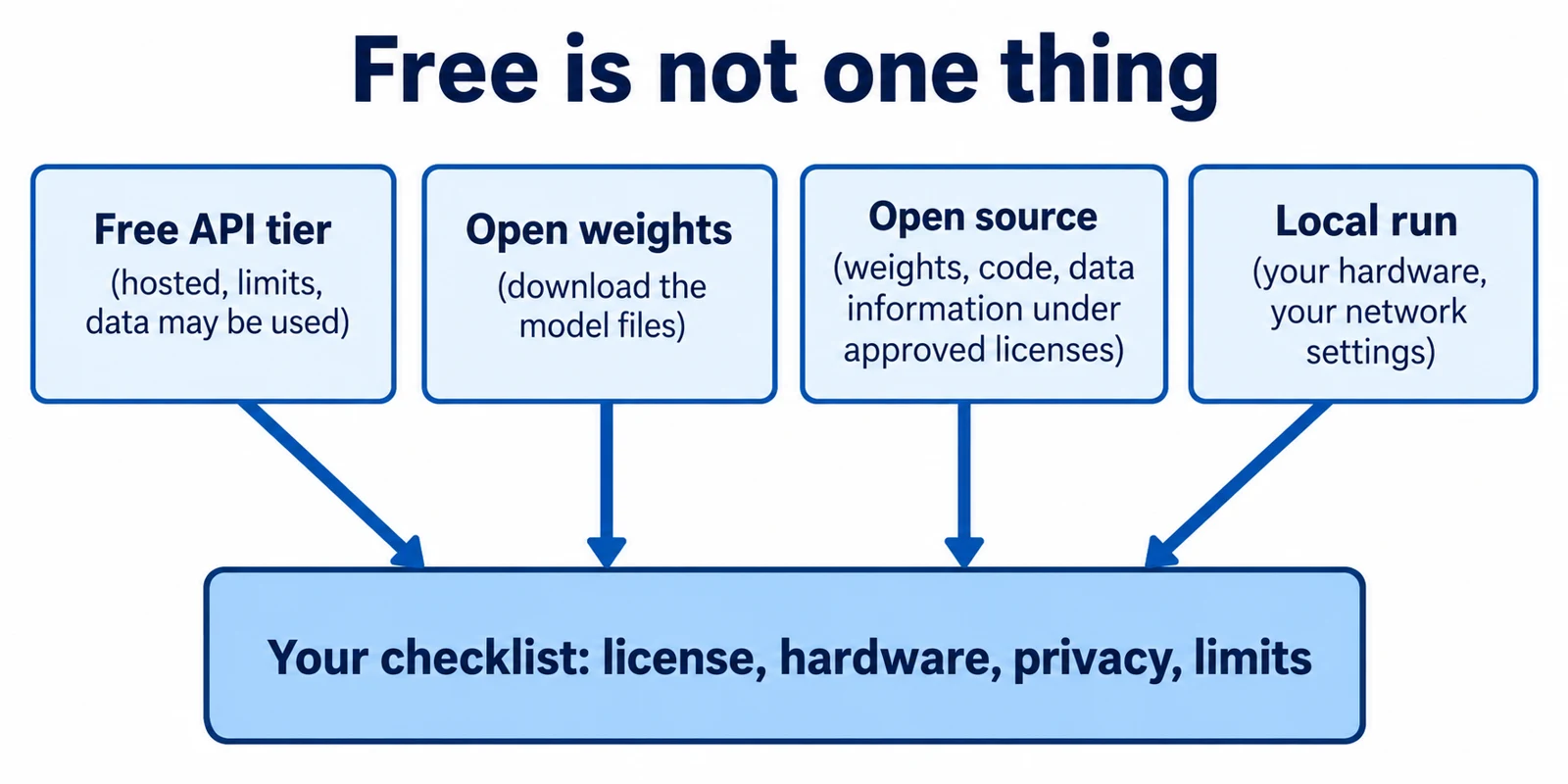
An open-weight model is one whose trained numbers (the "weights") you can download. That is different from open source, which also needs a license that lets you use, change and share the work. A free web or API tier is different again: you use someone else's computer under their rules, and you get no files. This article focuses on downloaded models and local inference, which means running a model on your own hardware.
Article index
- Why weights decide memory use
- Quantization: smaller files, some quality risk
- Context length: the memory you forget
- Why huge announced models rarely fit at home
- License and privacy checks
- A worked example
- Common mistakes
- Recap
- Research Sources
Why weights decide memory use
A model is a very large list of numbers called parameters. To answer a prompt, the program must hold those numbers in fast memory. On a computer with a graphics card (GPU), that memory is VRAM. On other machines it is ordinary RAM.
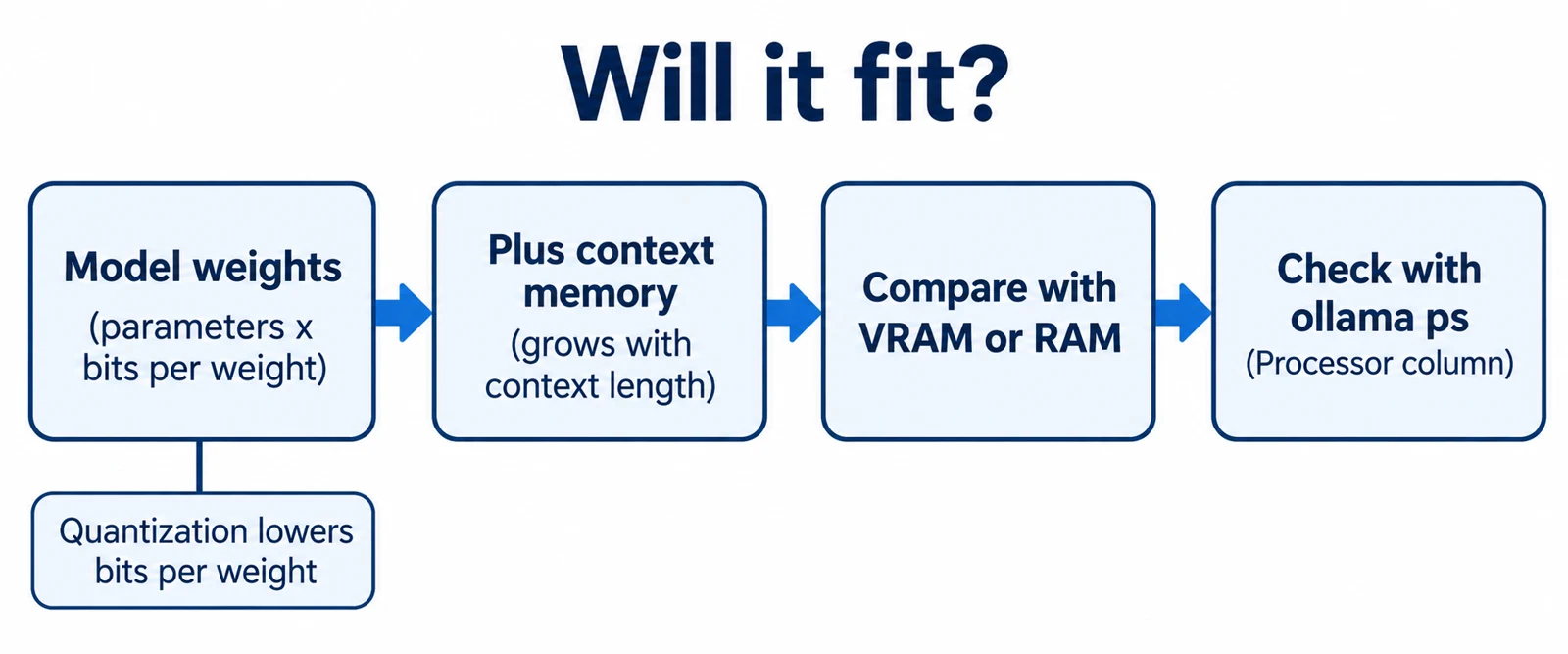
The rough size of the weights is simple: number of parameters times the storage per parameter. The storage per parameter is measured in bits. A model stored at 16 bits per weight needs about twice the space of the same model stored at 8 bits. This is a rule of thumb from arithmetic, not a measurement of any one program.
The llama.cpp project, a widely used open-source engine for local inference, states that its quantize tool treats memory and disk needs as the same, because models are currently loaded fully into memory. Its quantize documentation gives sizes for Llama 3.1 models. The 8B version is 32.1 GB in its original form, and the 70B version is 280.9 GB.
Quantization: smaller files, some quality risk
Quantization stores each weight with fewer bits. It trades some precision for a smaller file and lower memory use. The llama.cpp README lists support for 1.5-bit, 2-bit, 3-bit, 4-bit, 5-bit, 6-bit and 8-bit integer quantization to speed up inference and reduce memory use.
The quantize documentation shows what this means for one model, Llama 3.1 8B. The 16-bit version (F16) is 14.96 GiB. The Q4_K_M version, a common 4-bit-class choice, is 4.58 GiB at about 4.89 bits per weight. The Q8_0 version is 7.95 GiB.
Smaller is not free. The same documentation says quantization "may introduce some accuracy loss," usually measured with perplexity or KL divergence (two ways to compare a compressed model with the original). It gives no quality numbers in the part I read. So a smaller file is a documented fact, but how much quality you lose on your own task is something you must test.
The documentation also lists text-generation speeds for that model on its test setup. Speed tended to be lower for larger formats. Those speeds depend on the tester's hardware, so do not treat them as what your computer will do.
Context length: the memory you forget
The context window is how much text the model can consider at once, counted in tokens (small pieces of words). The weights are only part of the memory bill. The running conversation needs space too, and a longer context needs more.
Ollama, a popular local runner, documents this directly. Its context length page says the default depends on VRAM: 4k tokens under 24 GiB, 32k from 24 to 48 GiB, and 256k at 48 GiB or more. It also says that "Setting a larger context length will increase the amount of memory required to run a model." For web search, agents and coding tools, the page recommends at least 64,000 tokens.
Parallel use adds more. Ollama's FAQ says required RAM scales with OLLAMA_NUM_PARALLEL times OLLAMA_CONTEXT_LENGTH. The default for parallel requests is 1. If you share one local model with several users or tools, plan for more memory.
When a model does not fit in VRAM, llama.cpp can split the work. Its README describes CPU+GPU hybrid inference that partially accelerates models larger than the total VRAM. The model still runs, but in my explanation, the part left on the CPU is usually the slow part, so check the split instead of assuming speed.
Why huge announced models rarely fit at home
Some new open-weight models are very large. A mixture-of-experts (MoE) model has many parts called experts, and only some are used for each token. These are described with two numbers: total parameters and active parameters.
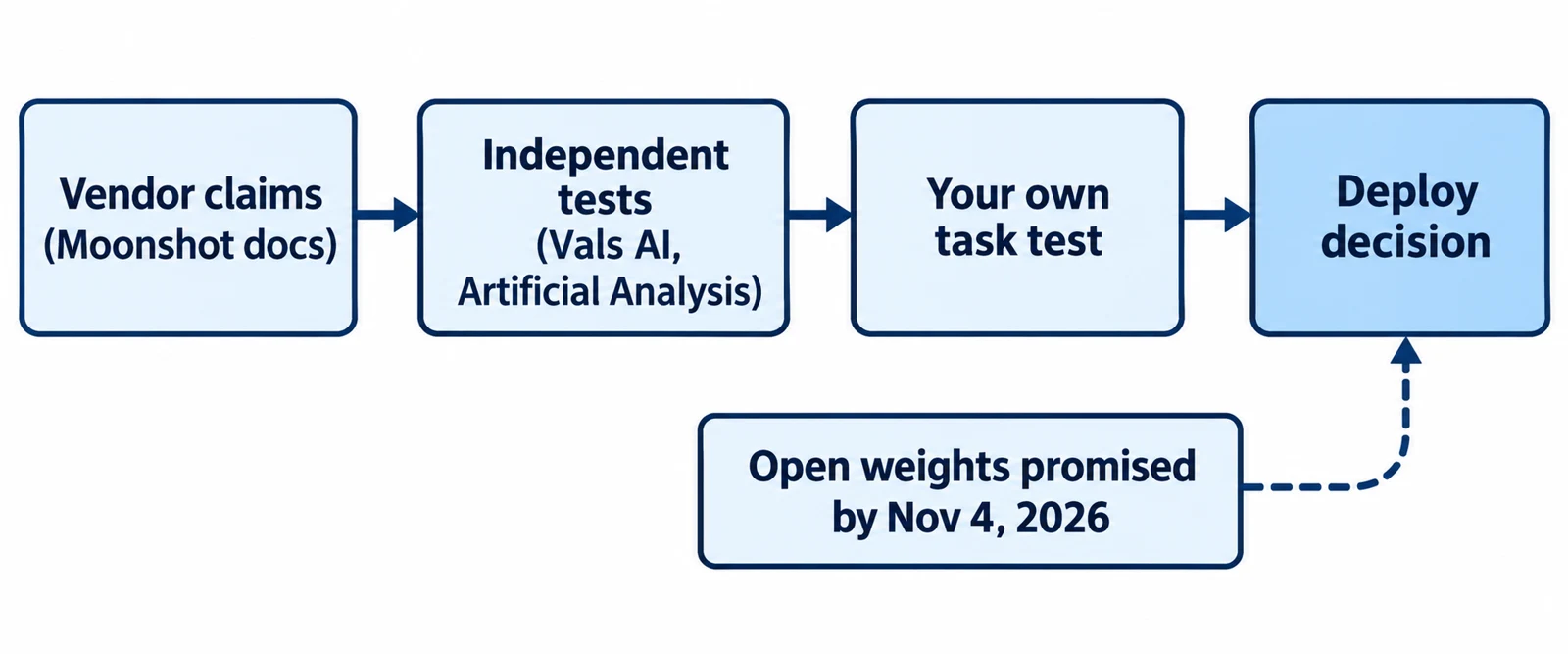
TechCrunch reported on October 5, 2026 that Reflection AI's Beam is a text-only MoE model with 501 billion total parameters and 23 billion active. The article says Reflection planned to release the weights and technical details "this month," and it does not state a license. Reflection's claims, such as matching leading Chinese open models at much lower cost, were described as not independently verified. Treat them as vendor claims.
Here is the memory lesson, as my own explanation. A model generally has to keep all its experts available, so total parameters, not active ones, drive how much memory you need to hold the weights. Active parameters mostly affect speed. As an illustrative calculation only, 501 billion weights at about 4.89 bits each come to roughly 306 GB before any context memory. That is far beyond a typical laptop. I did not verify whether Beam's weights were released, so check its official page before planning around it.
License and privacy checks
Check the license before you download. A model card is the model's information page, and it should name the license. IBM's Granite 4.1 8B card lists "apache-2.0," a 131072-token sequence length, and an April 29th, 2026 release date. It also shows no access gate on the page I read.
Apache 2.0 is a permissive license. Its full text says that if you redistribute the work, you must give recipients a copy of the license and keep attribution notices. It does not grant permission to use the licensor's trademarks. It also provides the work "AS IS," without warranties. Other model licenses can add restrictions on commercial use or user numbers, so read each one rather than assuming.
The model card also carries safety warnings. IBM's card says the model "may in some cases produce inaccurate, biased, or unsafe responses," that non-English performance might differ from English, and that users should run their own safety testing. A free license does not make outputs correct.
For privacy, local and cloud are different things. Ollama's FAQ says "Ollama runs locally. We don't see your prompts or data when you run locally." For its cloud-hosted models, the FAQ says prompts are processed to provide the service, not stored or logged, and not used for training. That is the vendor's statement, not something I tested. Cloud models are a hosted service, not local inference, so do not count them as open weights.
One more setting matters. The FAQ says Ollama binds to 127.0.0.1 on port 11434 by default, which means only your own machine can reach it. Setting OLLAMA_HOST changes that. If you expose the server on a network, anyone who can reach it may be able to use your model, so add network controls first.
A worked example
Illustrative scenario, not a test I ran. A reader has a laptop with 16 GB of memory and wants to summarize private meeting notes with Granite 4.1 8B. The numbers below come from the sources above plus simple arithmetic. Prerequisites: Ollama installed, and a model build you trust.
- Read the model card. Input: the Granite card. The card shows Apache 2.0, a 131072-token sequence length, and a Safetensors section that says 9B parameters while the title says 8B. Result: the license permits the planned use, but the parameter count is inconsistent, so plan with the larger 9B figure. This matters because a low estimate would hide a memory shortfall.
- Estimate weight memory. Input: 9 billion parameters. At 16 bits (2 bytes) each, that is about 18 GB. Using the roughly 4.89 bits per weight that Llama 3.1 8B shows for Q4_K_M, it is about 5.5 GB. Result: a full-precision copy would not fit in 16 GB, but a 4-bit-class copy might. This is an estimate because a different model architecture can differ from the Llama figures.
- Add room for context. Input: meeting notes of modest length. Ollama's default context is 4k tokens below 24 GiB of VRAM. Result: keep the default for short notes, and raise
OLLAMA_CONTEXT_LENGTHonly if the notes are longer. Each increase takes more memory, so raise it in steps. - Get the file from the right place. Input: a download link. Use the publisher's repository or a build you can trace to it, and prefer formats that do not run code on load. Result: you know the file's origin. This matters because a model file from an unknown uploader is untrusted data.
- Run it and check the split. Input: the loaded model. Run
ollama psin a terminal. This lists running models. Look at the PROCESSOR column: "100% GPU" means the model loaded entirely into the GPU, per the FAQ, while a CPU/GPU split means part is offloaded. Result: you see whether it fits as planned. If it is split and slow, try a smaller quantization or a smaller model. - Confirm the privacy setup. Input: your Ollama settings. Check that
OLLAMA_HOSTis not set to expose the server, and that you are using a local model, not a cloud one. Result: prompts stay on your machine. This matters because the notes are private. - Test quality on your own notes. Input: a few non-sensitive sample notes with known facts. Compare the summaries against the originals. Result: you learn whether the quantized model is good enough. If it misses key facts, try a larger quantization and repeat step 5.
Common mistakes
- Counting only the file size. Context memory and parallel requests come on top. Correction: leave headroom and verify with
ollama ps. - Using active parameters to size an MoE model. Correction: size memory from total parameters, then treat active parameters as a speed hint.
- Calling a free API "open source." A free tier gives access, not files or a reuse license. Correction: look for downloadable weights and a license on the model card. I did not verify any free-tier limits for this article, so check each provider's current page.
- Trusting a launch announcement. A statement that weights will arrive is not a release. Correction: confirm that a model page exists with files and a license.
- Assuming quantization is harmless. Correction: test on your own task, since the documentation itself warns of possible accuracy loss.
- Exposing the local server. Correction: keep the default 127.0.0.1 binding unless you have network controls.
Recap
- Weight memory is roughly parameters times bits per weight, and the whole model is loaded into memory.
- Quantization shrinks files, for example Llama 3.1 8B from 14.96 GiB (F16) to 4.58 GiB (Q4_K_M), but it may cost accuracy.
- Longer context and more parallel requests need more memory, as Ollama documents.
- Large MoE models need memory for total parameters, so many announced models are out of reach for ordinary computers.
- Read the model card for license and limits, and treat vendor claims as unverified until independent tests exist.
- Local running keeps prompts on your machine by Ollama's own description, but cloud models and exposed servers change that.
Research Sources
- llama.cpp README (ggml-org): quantization bit widths, hybrid CPU+GPU inference, MIT license.
- llama.cpp quantize documentation: memory and disk statement, Llama 3.1 sizes and bits per weight, accuracy-loss note.
- Ollama context length documentation: default context by VRAM, memory growth,
ollama ps. - Ollama FAQ: local privacy statement, default bind address, parallel-request memory scaling, cloud model statement.
- IBM Granite 4.1 8B model card on Hugging Face: license, sequence length, release date, limitations.
- Apache License 2.0: redistribution, trademark and warranty terms.
- TechCrunch, October 5, 2026: Reflection debuts Beam: size, planned weights release, unverified vendor claims.